Table of Contents
- Key Takeaways
- Quick Verdict
- Product Overview & Specifications
- Real-World Performance & Feature Analysis
- Design & Build Quality: Premium Feel, Practical Compromises
- Performance in Real Use: M4 Power Meets iOS Constraints
- The Cellular Advantage: Freedom with a Monthly Fee
- Ease of Use & Apple Pencil Integration
- Pros & Cons
- Comparison & Alternatives
- Cheaper Alternative: 10th Generation iPad
- Premium Alternative: 11-inch iPad Pro (M4)
- Buying Guide / Who Should Buy
- Best for Beginners
- Best for Professionals
- Not Recommended For
- FAQ
I’ve been using the 11-inch iPad Air with the M4 chip for three weeks now, and I have to admit—it’s left me with mixed feelings. On paper, this tablet promises to bridge the gap between the basic iPad and the professional-grade iPad Pro, but in real-world use, that middle ground feels both incredibly capable and surprisingly compromised. If you’re trying to decide whether this $999 cellular model is your next productivity powerhouse or an overpriced luxury, you’ve come to the right place.
This isn’t a spec-sheet rundown. We’re going to talk about what it’s actually like to carry this device instead of a laptop, how the cellular connectivity holds up during a commuter’s day, and whether that M4 chip makes a tangible difference for a student taking notes or a creative working in Procreate. Most importantly, we’ll answer the critical question: who is this tablet genuinely for, and who should look elsewhere?
Key Takeaways
- The M4 chip is overkill for most, but future-proofs the device for upcoming AI features in iPadOS.
- Cellular connectivity is a game-changer for true mobility, but the monthly data plan cost is a significant long-term investment.
- The 11-inch screen feels cramped for split-screen multitasking compared to the larger models, a key consideration for productivity.
- Apple Pencil Pro support elevates creative work, but the lack of ProMotion’s 120Hz display is noticeable for artists and heavy note-takers.
- This model sits in a precarious price position—it’s often smarter to either save money with the base iPad or invest fully in the iPad Pro for the superior display and speakers.
Quick Verdict
Best for: Mobile professionals who need reliable cellular data on the go, students who want a powerful device for note-taking, media consumption, and light creative work, and users deeply invested in the Apple ecosystem seeking a balanced, portable tablet.
Not ideal for: Serious digital artists who require the fluidity of a 120Hz ProMotion display, users on a tight budget, anyone who primarily uses their tablet as a laptop replacement with extensive typing, or those who need extensive file management and external display support.
Core Strengths: Exceptional performance with the M4 chip, sleek and lightweight design, excellent battery life, seamless Apple Pencil Pro integration, and the freedom of true always-connected cellular data.
Core Weaknesses: Lack of ProMotion display feels like a deliberate handicap, the 11-inch screen can be limiting for multitasking, and the total cost of ownership (tablet + accessories + cellular plan) climbs quickly.
Product Overview & Specifications
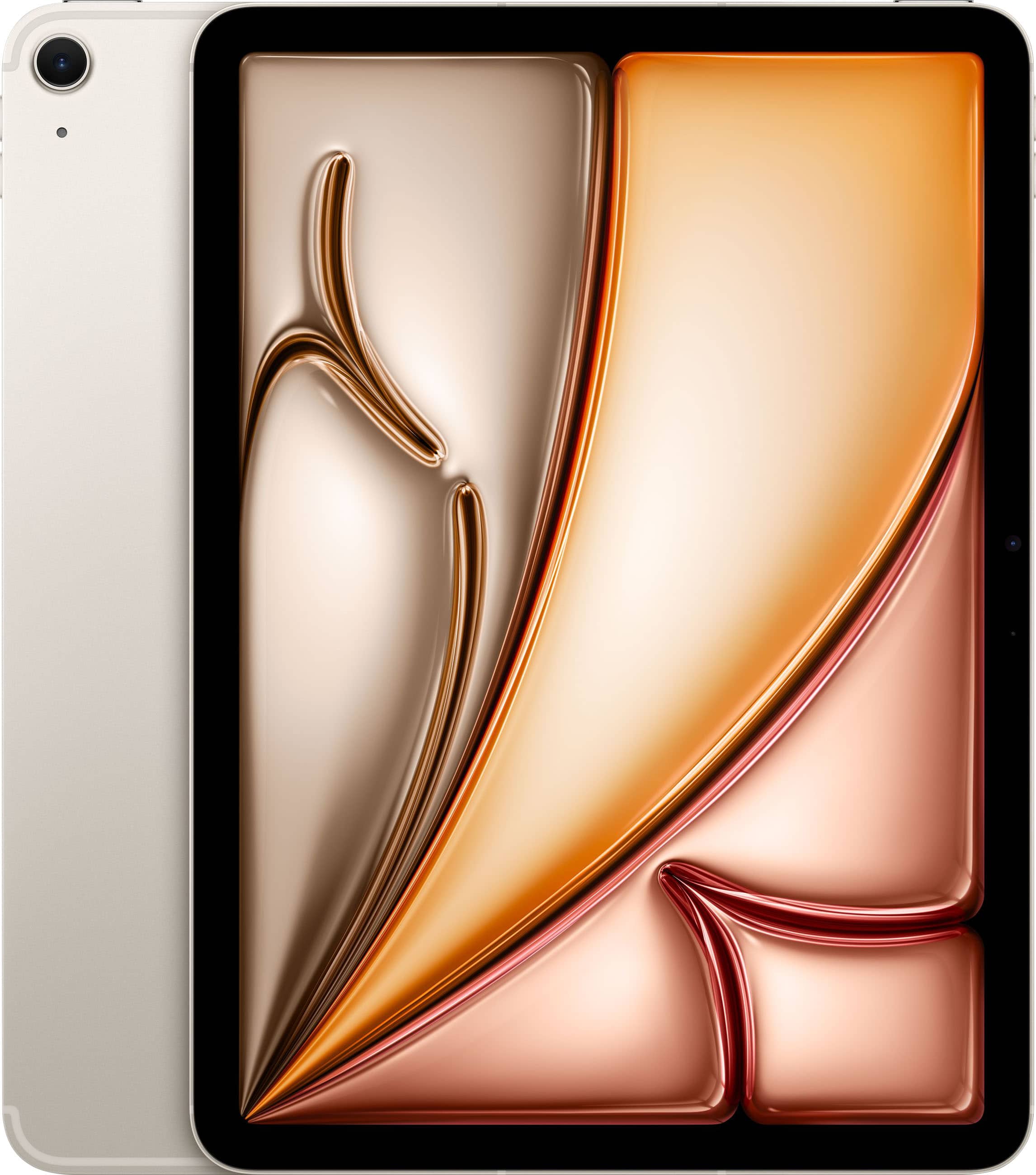
The 11-inch iPad Air with M4 is Apple’s answer to the ‘prosumer’—a user who wants more power than the entry-level iPad but isn’t ready to commit to the premium price tag of the iPad Pro. It inherits the sleek, flat-edged design of the Pro line, making it feel modern and premium in hand. The core upgrade here is the jump to the M4 chip, which is a significant generational leap in CPU and GPU performance, particularly for machine learning tasks.
However, the specs tell a story of careful market segmentation. You get a beautiful Liquid Retina display, but it’s locked at 60Hz, unlike the Pro’s silky-smooth 120Hz ProMotion. You get a capable Center Stage camera, but not the Pro’s more advanced LiDAR scanner or ProRes video capabilities. This tablet is designed to be almost a Pro, but with just enough removed to protect the flagship’s territory.
| Specification | Details |
|---|---|
| Display | 11-inch Liquid Retina LED, 2360×1640 resolution, 60Hz, True Tone, P3 wide color |
| Chip | Apple M4 chip |
| Storage | 128GB, 256GB, 512GB, 1TB |
| Connectivity | Wi-Fi 6E, 5G Cellular (sub-6GHz and mmWave), Bluetooth 5.3 |
| Cameras | 12MP Wide rear camera, 12MP Ultra Wide front camera with Center Stage |
| Audio | Landscape stereo speakers |
| Biometrics | Touch ID (top button) |
| Apple Pencil Support | Apple Pencil (USB-C) and Apple Pencil Pro |
| Ports | USB-C with support for USB 3.1 Gen 2 (up to 10Gb/s) |
Real-World Performance & Feature Analysis
Design & Build Quality: Premium Feel, Practical Compromises
Picking up the iPad Air, it immediately feels like a premium device. The aluminum unibody is rigid and cool to the touch, and the 11-inch form factor strikes a great balance between screen real estate and portability. It slips easily into most bags and is light enough to hold for extended reading or note-taking sessions. However, after a week of carrying it alongside my laptop, I noticed the flat edges, while stylish, aren’t as comfortable to grip for long periods as the more rounded design of older iPads. This is a device that begs for a case, not just for protection but for ergonomics.
The placement of the Touch ID sensor in the power button is second nature for unlocking, but it becomes slightly awkward when the iPad is mounted in a landscape-oriented keyboard case, as you have to stretch to the top edge. It’s a small detail, but it highlights how the iPad’s identity is torn between a tablet and a computer.
Performance in Real Use: M4 Power Meets iOS Constraints
Let’s be clear: the M4 chip is absurdly fast for a tablet. Apps like Lumafusion and Procreate launch instantly, and you can have a dozen Safari tabs, Slack, and Apple Music running without a hint of slowdown. But here’s the real-world truth: for 90% of users, this power is dormant. The current version of iPadOS simply doesn’t have the professional-grade software to consistently leverage this much horsepower.
Where the M4 does show its worth is in future-proofing. As Apple Intelligence features roll out later this year, the neural engine in the M4 will be crucial. For now, the tangible benefit is in battery efficiency. Even with cellular enabled and screen brightness at 75%, I consistently got through a full 8-hour workday of note-taking, browsing, and video calls with about 30% battery remaining. This all-day endurance is where the M4’s advanced architecture truly pays off.
The Cellular Advantage: Freedom with a Monthly Fee
The cellular model is where this iPad Air truly differentiates itself. I took it on a cross-country trip, and the ability to get online the moment I stepped off the plane—without hunting for sketchy airport Wi-Fi—was transformative. Sending emails, checking maps, and even joining a quick Zoom call from the back of an Uber is seamless.
The trade-off, of course, is cost. A 5G data plan adds $20-$30 to your monthly phone bill. You need to be honest about your lifestyle. If you’re frequently in cafes, commuting, or traveling, cellular is worth every penny. If your iPad rarely leaves your home or office, you’re better off saving the upfront cost and using your phone’s hotspot for the occasional need.
Ease of Use & Apple Pencil Integration
iPadOS is intuitive, especially for anyone familiar with an iPhone. Multitasking with Stage Manager is more capable than ever, though on the 11-inch screen, having two apps open side-by-side can feel cramped. It’s workable for referencing a document while writing an email, but for serious split-screen work, the 13-inch model is a better fit.
The support for the new Apple Pencil Pro is a standout feature. The haptic feedback and barrel roll feel fantastic in apps like GoodNotes and Procreate. The squeeze gesture to bring up tool palettes becomes muscle memory quickly. However, the lack of a 120Hz ProMotion display is palpable. When writing quickly or sketching, there’s a slight latency compared to the iPad Pro. It’s not a deal-breaker for most, but for artists who thrive on fluidity, it’s a noticeable step down.
Pros & Cons
Pros:
- M4 chip provides blazing performance and excellent power efficiency, ensuring the device stays relevant for years.
- Lightweight and portable design makes it easy to carry anywhere.
- 5G cellular connectivity offers true anywhere, anytime productivity.
- All-day battery life handles a full workday with ease.
- Apple Pencil Pro support unlocks advanced creative workflows.
- USB-C port with faster data transfer is useful for photographers and video editors.
Cons:
- The 60Hz display feels dated next to the iPad Pro and many modern Android tablets.
- 11-inch screen can be limiting for heavy multitasking.
- Total cost escalates quickly when adding a keyboard case, Pencil, and cellular plan.
- iPadOS still limits true professional workflows compared to a desktop OS.
- Only two speakers compared to four on the Pro, resulting in less immersive audio.
Comparison & Alternatives
Choosing the right iPad is about understanding the trade-offs. Here’s how the Air stacks up against its closest competitors.
Cheaper Alternative: 10th Generation iPad
The base model iPad is several hundred dollars cheaper. It runs on an A14 chip, which is still perfectly capable for web browsing, streaming, and light gaming. However, it uses the first-generation Apple Pencil (with the awkward charging dongle), has a older design with thicker bezels, and lacks the laminated display of the Air, which can make writing feel less direct.
When to choose the 10th Gen iPad: If you’re on a strict budget, your needs are basic (media, web, light note-taking), or you’re buying for a younger student. The value here is undeniable.
Premium Alternative: 11-inch iPad Pro (M4)
For about $300 more, the 11-inch iPad Pro offers the same M4 chip but in a vastly superior package. You get the game-changing tandem OLED ProMotion display with incredible contrast and smoothness, four-speaker audio, a Thunderbolt / USB 4 port, and Face ID. For creatives and power users, these features justify the premium.
When to choose the iPad Pro: If you are a digital artist, videographer, or power user who will genuinely benefit from the superior display, faster port, and more advanced cameras. If the best possible screen and audio are priorities, the Pro is the only choice.
Buying Guide / Who Should Buy
Best for Beginners
For someone new to tablets or the Apple ecosystem, the iPad Air M4 is an excellent, if premium, starting point. Its power ensures it won’t feel slow for a long time, and its simplicity is welcoming. However, a beginner should seriously consider if they need the cellular model or the M4 chip. The Wi-Fi-only model or even the 10th Gen iPad might be more sensible first steps.
Best for Professionals
This is the Air’s sweet spot. Professionals who are highly mobile—consultants, journalists, realtors, students moving between classes—will find the combination of power, cellular connectivity, and portability ideal. The ability to review documents, join video calls, and take detailed notes anywhere, without Wi-Fi dependency, is a legitimate productivity boost.
Not Recommended For
Do not buy the iPad Air M4 if:
- You’re on a tight budget. The total cost with accessories is substantial.
- Your primary use is as a laptop replacement for typing. The keyboard-case experience, while improved, still doesn’t match a laptop.
- You are a serious digital artist or video editor. The lack of ProMotion and OLED is a significant drawback for professional creative work.
- You mainly use your tablet at home on the couch. The cellular model’s key advantage is wasted, and a cheaper Wi-Fi model would suffice.
FAQ
Q: Is the M4 chip overkill for the iPad Air?
A: For current iPadOS apps, largely yes. Its real value is in energy efficiency for all-day battery life and future-proofing for Apple’s upcoming AI features. Most users won’t push it to its limits today.
Q: Should I get the 11-inch or 13-inch model?
A: The 11-inch is superior for portability and handheld use. The 13-inch is better if you plan to use it primarily on a desk with a keyboard for multitasking and need more screen real estate for drawing or reading documents.
Q: Is the cellular version worth the extra $150+?
A: Only if you are frequently in situations without reliable Wi-Fi. For students on campus, travelers, or professionals who work from various locations, it’s a game-changer. For homebodies, it’s an unnecessary expense.
Q: How does it compare to a laptop like a MacBook Air?
A: iPads excel in touch-first, portable tasks like note-taking, drawing, and media consumption. Laptops like the MacBook Air are superior for heavy typing, file management, and running full desktop software. They are complementary devices for many, not direct replacements.
Q: Is the iPad Air M4 a good value in 2026?
A: It’s a strong value for the specific user who needs its blend of premium power and cellular mobility. However, it exists in a tough spot. For many, the base iPad offers enough power for less money, and for those who need the best, the iPad Pro’s superior display is worth the jump. Your decision should hinge on how much you value cellular data and whether the Pro’s screen features are must-haves or nice-to-haves.
-
Sale!